The Process
We are excellent at keeping secrets at Giga-Green, but that doesn’t mean our process is! In fact, it’s not our process at all!
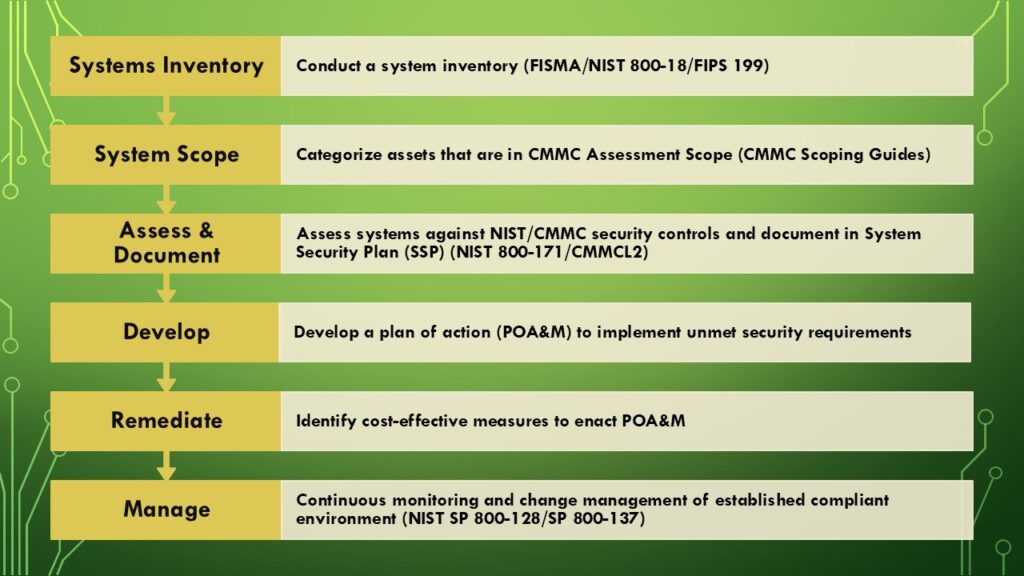
When contracting with the Federal Government, you want to follow their methods and practices. That is why we adopted their methodology via the National Institute of Standards and Technology (NIST) Special Publication 800-series. No matter where you are within your cybersecurity maturity, you can plug into the processes outlined within their documentation.
The entire NIST 800 Special Publication series can be found here: https://pages.nist.gov/NIST-Tech-Pubs/SP800.html
- Before you start
- Systems Inventory (beginning)
- System Scope
- Need help visualizing your systems?
- Assess & Document (the long of it)
- Develop a plan (POA&M)
- Remediate (tricky part)
- Manage (not the end)
- Contact a CMMC RP
Before you start
Before you begin your compliance journey, you need to understand your target goals. Does your environment need to support Federal Contract Information (FCI), Basic Controlled Unclassified Information (CUI), Specified CUI, ITAR, or Export Controlled data? Knowing your existing data is key here — but also working with your contracting officers to determine what can be included in a contract is advisable.
Are you going to certify one environment for FCI and CUI, or two different environments, one for each at their respective levels?
What technologies can you do without? What technologies are mission critical?
Will you be using your current environment, or will you build an enclave and migrate resources into it?
By predefining your compliance and organizational goals, this will save time when defining future requirements found by following the processes below.
Systems Inventory (beginning)
This is the start of your compliance journey. Do you know all the systems that FCI or CUI are stored on and flow through? What about the systems that support those systems? They may or may not be within certification scope, but it is good to understand what components exist in your environment when trying to define your certification boundaries.
Taking the extra time initially to discover all these locations and their entries and exits to your organization can help drastically reduce costs when building a POA&M and specifically the costs of remediation efforts.
Even if you later discover critical data in a new system or area of your environment, you add the system to your systems inventory and repeat the steps to implement controls.
NIST SP 800-18 is the guide to building a system inventory and structuring your System Security Plans: https://nvlpubs.nist.gov/nistpubs/Legacy/SP/nistspecialpublication800-18r1.pdf
Begin by gathering all your technical systems in use and add them to your inventory. If it stores, transmits, accesses, enters, edits, generates, manipulates, or prints data, put it in your systems inventory. Once you know all the components of your environment, you can properly categorize and label them, and then scope them.
Categorize and Label
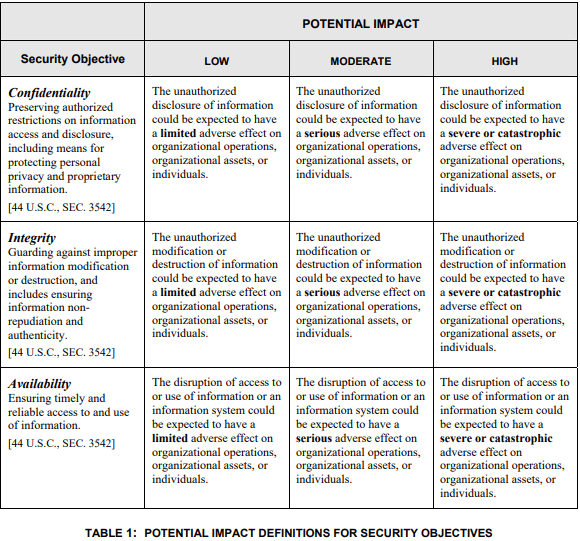
After gathering your complete systems inventory, you need to apply a categorization of asset and label under the guidance of FIPS 199.
Why do you need to do this? Because NIST 800-171 clearly states under the Basic Assumptions that “The confidentiality impact value for CUI is no less than [FIPS 199] moderate.”
This means that the loss of confidentiality of the information can have serious effects on the organization.
Systems are categorized (not scoped!) by Confidentiality, Integrity, and Availability. Review FIPS 199 table one below for more information.
System Scope
Alright, now you’ve got a detailed list of the individual systems in your environment. How do you know what applies to CMMC Level 1 or CMMC Level 2?
This is where we consult the more recent CMMC Scoping Guides from the DoD:
- CMMC Self-Assessment Scope Level 1 (defense.gov)
- CMMC Assessment Scope Level 2 (defense.gov)
- CMMC Assessment Scope Level 3 (defense.gov)
For our purposes, we will be reviewing the CMMC Level 2 scoping guide — but knowing where FCI exists in that environment is key. For example, you may find that you need to certify a separate environment for FCI that isn’t included within the CUI boundaries. This would require a second certification of those assets as a CMMC Level 1 resource.
The Level 2 scoping guide breaks assets into the following 5 categories:
Security Protection Assets Security Protection Assets provide security functions or capabilities within the contractor’s CMMC Assessment Scope. These result in Security Protection Data that are used to protect the OSA.
Examples: External/Managed Service Providers, Network Equipment, Door Systems, SIEM, EDR, Spam Filter
YOUR RESPONSIBILITY: Add to asset inventory, add to SSP, add to CMMC L2 Assessment Scope, configure and document CMMC Level 2 controls.
CUI Assets CUI Assets process, store, or transmit CUI as follows:
- Process — CUI can be used by an asset (e.g., accessed, entered, edited, generated, manipulated, or printed).
- Store — CUI is inactive or at rest on an asset (e.g., located on electronic media, in system component memory, or in physical format such as paper documents).
- Transmit — CUI is being transferred from one asset to another asset (e.g., data in transit using physical or digital transport methods).
Examples: Workstations, Servers, Cloud Services, Mobile devices, Printers
YOUR RESPONSIBILITY (as a DoD contractor): Add to inventory, add to SSP, add to CMMC L2 Assessment Scope, configure and document CMMC Level 2 controls.
Out-of-Scope Assets Assets and systems that CAN NOT process, store, or transmit CUI.
YOUR RESPONSIBILITY: You will need to prove through what mechanisms these objects cannot process CUI. Emphasis on the not. You will need to show which separation techniques you are using and how they are out of CUI boundaries.
Examples: Workstations on isolated subnets, separate facilities, Guest Networks
If you have an asset that doesn’t fall into any of the specific categories, it is likely out of bounds of your certification scope, but you will need to demonstrate which separation techniques are used to keep them out of scope.
Contractor Risk Managed Assets Contractor Risk Managed Assets are capable of, but are not intended to, process, store, or transmit CUI because of the security policy, procedures, and practices in place.
Examples: Thin clients, Workstations that access Cloud VDI
YOUR RESPONSIBILITY: Add to asset inventory, add to SSP, add to CMMC L2 Assessment Scope, configure and document according to your security policies. May or may not be assessed based on documentation.
Specialized Assets See scoping guidance for specifications.
Examples: Government Property, IoT or Industrial Internet of Things (IIoT), OT, Restricted Information Systems, Test Equipment
Need help visualizing your systems?
Whether or not they’re in scope, and their interconnections? We’ve built some tools (Visio / Excel) for exactly this.
We offer two versions of the tools that help you count and identify systems and their interconnectivity:
- Hybrid Datacenter — on-premises with cloud services
- Cloud Services (M365) — with or without physical location
Enter your email to receive the CMMC Architecture Tools download:
Assess & Document (the long of it)
Once you have completed your systems inventory and scoped the systems to their respective asset types, you now need to assess in-scope assets against NIST 800-171 / CMMC L2 controls. Yes, all 110 practices against each system. Your first time through a system, there aren’t really any tricks here besides knowing the technical and security terms used within the assessment guides.
This takes time — there is no way around it. Pick a day, pick a system, clear a blank page in your System Security Plan (SSP) with the controls preloaded, and go through the controls one by one, down to the control objective level (a, b, c, d) and document how you are satisfying that control or not. Don’t get discouraged — it’s all fixable. Why does this take so long? You are assessing down to the control objective level which totals over 300 objectives per system.
If a control objective is completed by a policy or procedure, make sure to reference it in that particular SSP. If you lack a policy control, note that and continue on (these are just paperwork later on).
For every unsatisfied control objective, add this item to a different document to start what is called your Plan of Action and Milestones (POA&M). You will come back to these later. Make sure you identify the system and control objective that is not being met. You may have many systems that need similar controls applied — for example, MFA needs to be on all cloud applications and workstations.
NIST Resources:
Develop a plan (POA&M)
Your Plan of Action and Milestones (POA&M) document is exactly that — your organization’s technical debt against the checked DFARS box. But it is not all doom and gloom.
More than where you are failing compliance, a POA&M is your pathway forward to becoming compliant. POA&Ms aim to keep a high-level list of items that need to be rectified. This will allow you to make strategic decisions when selecting software or security services. A proper POA&M can and will include multiple projects or solutions to satisfy your needs.
Each organization is different depending on their existing solutions, and remediating your POA&M can have many different forms. Some organizations adopt cloud enclaves, some require physical locations, some rebuild networks, some have one building, others many facilities — it’s almost impossible to predict what your POA&M would be in the end, and this is where it likely takes outside consultants to map the deficiencies to a cost-effective solution to remain compliant.
- NIST 800-37 (Rev 2) — Risk Management Framework for Information Systems and Organizations
- NIST 800-115 — Technical Guide to Information Security Testing and Assessment
- NIST-provided POA&M template
Remediate (tricky part)
This is where Giga-Green prides ourselves on meeting our customers on their (and the government’s) terms.
This is also where “our process” actually is our own. We start by reviewing your existing Systems Inventory and POA&M to understand current solutions on hand and any known deficits. Once we understand your environment’s existing components, we can then recommend any software tools, migration strategy, documentation, and/or training that may be necessary to reach a compliant state.
We understand you’ve made investments in your existing technology and cannot interrupt business operations. We’ve planned, implemented, and continue to support a wide array of compliant environments including Microsoft 365 GCC High cloud-only environments, hybrid datacenters, remote workers, and traditional on-premise environments — including singular and multiple locations. Let us use our experience and knowledge of technology solutions to help you plan your best course to compliance.
Common remediation paths we deliver include our CAPE preparation engagement, GCC / GCC High migrations, and C3PAO assessment prep.
Schedule a time with one of our CMMC RPs here.
Manage (not the end)
Even after implementing a compliant environment, cybersecurity is an ongoing process. Not only do specific controls from within NIST 800-171 / CMMC L2 require ongoing maintenance, patching, and security updates (MA 3.7.1), CVE monitoring and remediation (RA 3.11.2 & 3.11.3), and many more — but you must also ensure new systems are integrated correctly and proper change management procedures (CM 3.4.3) are followed.
This is where we want to be your extra set of hands.
Business needs undoubtedly change and drive the change within your security architecture. Proper change management procedures and monitoring of existing security solutions play a key role in keeping your organization safe and compliant for your certification renewal in following years.
NIST resources:
- Guide for Security-Focused Configuration Management of Information Systems (NIST SP 800-128)
- NIST SP 800-137 — Information Security Continuous Monitoring (ISCM)
Contact a CMMC RP
Tell us where you are in your CMMC journey and we’ll follow up within one business day.
Prefer to reach us directly? info@giga-green.com · +1 (701) 630-7188
Frequently asked questions
Where should I start with CMMC?
With a full systems inventory. You cannot scope, assess, or remediate systems you don't know exist. Every downstream step — SSP authoring, POA&M creation, SPRS scoring, C3PAO assessment — depends on knowing what's in your environment.
What is a System Security Plan (SSP) and do I need one?
An SSP documents how each in-scope system meets each NIST SP 800-171 control objective. Yes — every CMMC Level 2 assessment requires an SSP. It is the primary document your C3PAO will read to understand your compliance posture.
What is a POA&M?
A Plan of Action and Milestones documents any control objective that is not fully implemented, with a plan and deadline to close it. Under the CMMC Final Rule, you can achieve conditional Level 2 certification with a POA&M but must close every open item within 180 days.
How is SPRS calculated?
The Supplier Performance Risk System (SPRS) score starts at 110 and subtracts weighted points for each control that is not fully implemented — 1, 3, or 5 points depending on the control. A perfect score is 110; a score of 88 or higher generally maps to a passing Level 2 posture, but individual control weights matter for conditional certification.
What does 'remediation' actually look like?
It varies. Common remediation work includes migrating to Microsoft 365 GCC or GCC High, building a CUI enclave, tightening access controls, deploying MFA everywhere, implementing endpoint detection and response, writing policies and procedures, running tabletop exercises, and delivering security awareness training. The mix depends entirely on your POA&M.
Do I need a CMMC Registered Practitioner (RP)?
You don't strictly need an RP to reach certification. But an RP has passed a Cyber-AB knowledge exam and agrees to abide by the CMMC Code of Conduct, which is useful when your contract requires assessor-adjacent work from a qualified partner. Giga-Green is a Registered Practitioner Organization.
What happens after we're certified?
CMMC certification is valid for three years. In between, you maintain the environment — patching (MA 3.7.1), CVE monitoring (RA 3.11.2 & 3.11.3), configuration management (CM 3.4.3), incident reporting to DIBCAC, annual affirmations for Level 1, and evidence updates as your systems change. Managed CMMC program support is the "Manage" phase of our process.